Google Search Console keeps evolving, and two recent additions are particularly worth your attention if you care about how your content performs in search. The first gives you visibility into generative AI search results for the first time. The second lets you track how your social and video content performs directly on Google Search. Here’s a walkthrough of both, including how to set them up.
Feature 1: Generative AI Performance Reporting
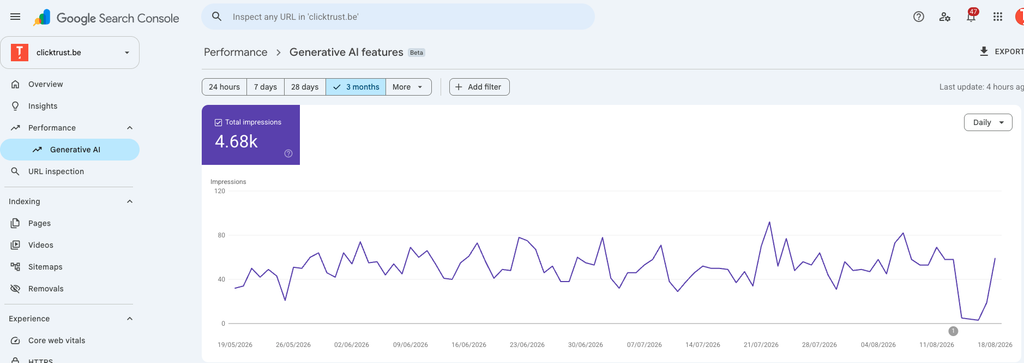
Inside the Performance section of Search Console, there’s now a dedicated Generative AI report sitting alongside the familiar Search Results, Discover, and News tabs.
Open it, and you’ll see a graph tracking impressions over time for your content’s appearances in Google’s generative AI results (think AI Overviews and similar AI-powered search experiences). Right now, impressions is the only metric available. Since this feature has only just rolled out, it’s reasonable to expect clicks and click-through rate to be added soon, mirroring the standard performance overview that already reports impressions, clicks, and CTR.
Scroll further down the report and you’ll find a breakdown by page, showing exactly how many impressions each URL generated within generative AI results. This is where things get genuinely useful. For example, one blog post on connecting Google Ads to Claude using MCP generated 192 impressions in this report. More striking still, the top-performing page over the last three months was a French-language article on generative engine optimization (GEO), which has been repeatedly surfaced to answer queries related to that exact topic.
That’s a meaningful signal. It tells you which pieces of content Google’s AI systems consider authoritative enough to draw from when generating answers, and it opens the door to optimizing specifically for generative search visibility, not just traditional blue-link rankings. Expect this report to become a core part of any SEO and content strategy as generative search continues to grow.
Feature 2: Search Performance for Social and Video Platforms
The second addition, rolled out on July 7th, is arguably even more significant for brands that are active on platforms like TikTok, YouTube, or Instagram. Search Console can now show you how content hosted on these platforms performs specifically within Google Search, separate from the platform’s own native analytics.
Setting it up takes just a couple of minutes:
- Go to search.google.com/search-console/welcome.
- Add a new property and connect it to the relevant account, for instance your company’s TikTok account.
- Agree to the terms, continue, and sign in.
- Google will add the property and begin processing the data and gathering insights.
Once the data has been collected, you’ll get a performance graph showing your total clicks from Google Search, broken down by where those clicks actually came from: standard web search, video search, or image search.
This is a powerful addition for any brand that regularly publishes content on social and video platforms. Instead of only seeing likes, views, and comments inside each platform’s own dashboard, you can now see how that same content performs as a discovery channel through Google itself. That makes it much easier to identify which videos or posts are driving real search visibility, double down on the formats and topics that are working, and rethink or retire the ones that aren’t.
Why Both Features Matter
Together, these two updates point in the same direction: Google is giving publishers and marketers more transparency into the parts of search that used to be a black box, generative AI answers and cross-platform content discovery. If you haven’t checked your Search Console account recently, now is a good time to look for both reports, since together they offer a much fuller picture of how your content is actually being found.